

[ BOOTING_ANDROID_14 ]
BVT EMULATOR Android · Games · Private network Android apps on your Windows PC.
- 10 $DEVICES_AT_ONCE
- 4 $SCREEN_SIZES
- 3 $NETWORK_SWITCHES
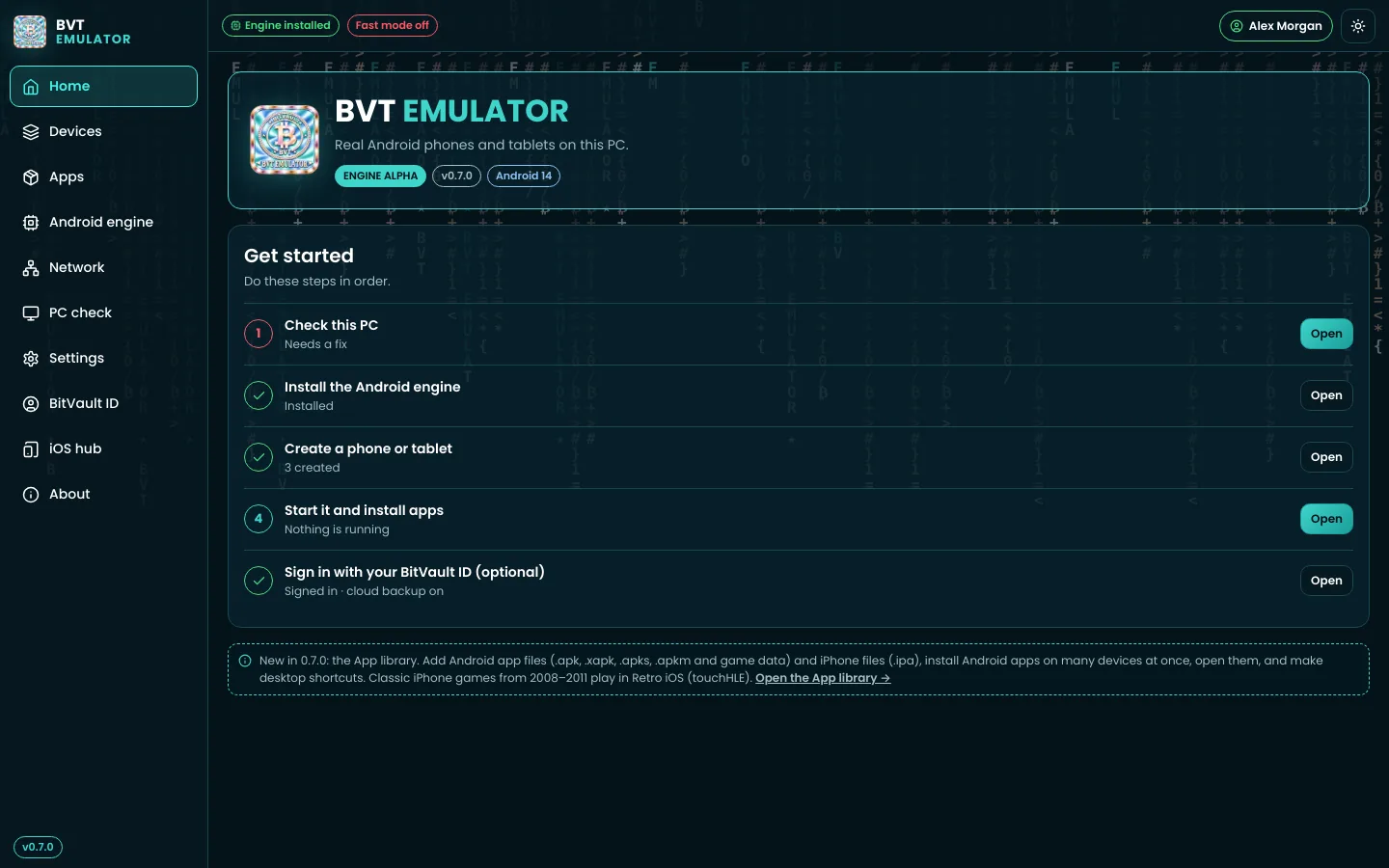
- 14 $ANDROID_VERSION
"Your phone, on your PC"
BVT EMULATOR runs Android 14 inside a Windows program. Make phones and tablets, start up to 10 at once, and play Android games with your mouse and keyboard. Every device keeps its own apps and sign-ins, and can have its own VPN, Proxy and DNS that change by themselves every few minutes. The App library keeps your Android app files (APK, XAPK, APKS, APKM and game data) and installs them on many devices at once. Software for Windows 10 and 11: download one file, open it, and Android runs on your PC.
Free · No card · Windows 10 and 11, 64-bit · Windows only · Early access · Built by BitVault
SCROLL_TO_ENTER[ /LIVE_DEVICES ]
The device board
Every phone and tablet on your PC, its screen, its memory, its network and what it is doing right now.
Example devices. Each device is a separate Android with its own apps, data and sign-ins, stored on your PC. When a device's VPN or Proxy stops, its kill switch stops that device's internet until the next address answers, so it never falls back to your own connection.
[ /HOW_IT_WORKS ]
Five steps
The first start takes a few minutes for the Android engine download. After that, a new phone is one button and starts in about a minute.
- ◆ Step 1
/PC_CHECK/
Check your PC
BVT EMULATOR checks Windows, memory, disk and whether your processor's virtualization is on. If Windows Hypervisor Platform is off, one button turns it on (Windows asks once, then a restart).
⚡ 1 button✓ Plain words - ◆ Step 2
/ANDROID_ENGINE/
Install the Android engine
One download from Google's own servers: the Android engine and Android 14. Every file is checked against Google's fingerprint, and a broken download continues where it stopped.
⚡ Android 14Checked - ◆ Step 3
/MAKE_A_DEVICE/
Make a phone or tablet
Choose phone, small phone, 10-inch or 12-inch tablet, give it 2 to 8 GB of memory and 2 to 8 processor cores, and a name. Make up to 10.
⚡ 4 sizesUp to 10 - ◆ Step 4
/PLAY/
Start and play
The Android screen opens inside BVT EMULATOR. Use the mouse as your finger, type with the keyboard and put game keys on the screen. Add apps to the App library and install them on one device or many.
⚡ Mouse + keys✓ App library - ◆ Step 5
/BITVAULT_ID/
Keep your setup
Sign in with a free BitVault ID (Google or email) and your settings and game keys are backed up in the cloud. On a new PC, sign in and get them back.
⚡ Backup✓ Optional
READYGame phone
Android 14 · 1080 × 2400 · built-in screen · started in 52 sINSTALLEDan APK on Work phone
dropped on the screen · the app is in the app listCHANGEDVPN address on Game phone
every 10 minutes · new exit checked before use · address hiddenSAVEDScreen recording
Game phone · 2 min 14 s · in your Videos folder[ /PHONES_AND_TABLETS ]
Phones and tablets, side by side
Each device is its own Android: its own apps, accounts, files and settings. Start one or ten, and switch between them.
- Four sizes: phone, small phone, 10-inch tablet and 12-inch tablet. 2 to 8 GB of memory and 2 to 8 processor cores for each.
- The screen sits inside BVT EMULATOR, sharp, balanced or light. Old graphics drivers can use the device's own window instead.
- Rotate, take screenshots and record the screen to a video file with one button.
- Copy and paste between Windows and Android both ways, and drag files from Windows into the device.
- Install apps from the App library, or drop an APK on a device. Set a GPS location anywhere in the world and the battery level, for testing apps.
[ /VPN_PROXY_DNS ]
VPN, Proxy and DNS for every device
Three switches on every device. Each one can stay on one address, or move to the next address in your list by itself.
- VPN and Proxy: the device's internet goes through a server from your list: SOCKS5, SOCKS4, HTTP or HTTPS servers from your provider, or Tor running on your PC. Use both and the Proxy runs through the VPN.
- DNS: Android's Private DNS for that device, for example Cloudflare, Google, Quad9 or your own.
- Change address every 5, 10, 20, 30 or 60 minutes, or press Change now. The new address is tested before the device uses it.
- Hide addresses on screen, and keep the Network page out of screenshots and screen sharing.
- Kill switch: if a VPN or Proxy stops, that device's internet stops too. A leak guard inside Android blocks traffic that tries to go around it.
- Passwords for your servers are encrypted by Windows for your Windows user.
[ /APP_LIBRARY ]
One App library for every device
Add app files once. Install them on one device or on many at the same time, open them, and put them on your Windows desktop.
- Android files: .apk, and split bundles from app sites: .xapk, .apks and .apkm (unprotected), plus .obb game data. BVT EMULATOR picks the parts each device needs and copies the game data to the right place.
- Many devices at once: tick the devices and press Install. Each one gets its own copy, with its own data and sign-ins.
- Desktop shortcuts: one click makes a Windows shortcut that starts the device and opens the app.
- Open from Windows: turn on “Open app files with BVT EMULATOR” and use Open with on any app file. Your default programs are not changed.
- Plain answers: before anything is installed, BVT EMULATOR reads the file and says what it is: an app that runs here, an app made only for phone (ARM) chips, or an iPhone file and what can be done with it.
[ /IPHONE_FILES ]
iPhone files: the honest version
App Store apps are locked by Apple to Apple devices. No program can run them on Windows, and BVT EMULATOR does not pretend to. Here is what it does instead.
- ● Available
/RETRO_IOS/
Classic iPhone games
Some 32-bit iPhone games from about 2008 to 2011 (iPhone OS 2 to iOS 4.0) play in their own window, powered by touchHLE, a separate open-source project. Most old apps still do not work; touchHLE's own compatibility list shows which games do. The games must be decrypted copies you own: BVT EMULATOR never decrypts, finds or shares them.
⚡ touchHLE2008–2011 games - ◆ Planned
/IOS_CLOUD/
For app developers
Stream your own iOS simulator build from a cloud service into BVT EMULATOR, with your own account. It is for testing apps you make, not for App Store copies. Not in this version.
DevelopersLater - ◆ Planned
/IPHONE_MIRROR/
Your own iPhone's screen
Show your iPhone's screen on your PC over Wi-Fi. The apps keep running on the iPhone; Apple does not let a PC control an iPhone with the mouse. Not in this version.
AirPlayLater
Add any .ipa file to the App library and BVT EMULATOR reads it and tells you plainly: a classic game for Retro iOS, an App Store copy that only runs on an iPhone or iPad, a modern app, or a developer's simulator build.
[ /GAMES ]
Play with mouse and keyboard
A big screen, a real keyboard and a mouse. Put keys on the game's buttons once, and every device remembers them.
- ◆ Game keys
/KEY_MAP/
Keys on the screen
Drop a key on any button of the game. Add a WASD or arrow-key joystick for walking. Each device keeps its own keys, and your BitVault ID can keep them in the cloud.
⚡ WASDBeta - ◆ Screen
/BUILT_IN_SCREEN/
Smooth picture
Choose sharp, balanced or light. Light uses less of your PC and gives more pictures per second. Graphics run on your graphics card, or in software on old drivers.
⚡ 3 levels✓ Full screen - ◆ Many at once
/MULTI_DEVICE/
More than one game
Run a game on one phone and chat on another, or test your app on a phone and a tablet at the same time. Stop all devices with one button.
⚡ Up to 10Stop all
Follow each game's rules. Some games do not allow emulators or more than one account per person; BVT EMULATOR does not hide itself from games or help to break their rules.
[ /BITVAULT_ID ]
One account, optional
BVT EMULATOR works fully without an account. Sign in with a free BitVault ID and your settings and game keys are kept safe in the cloud.
- 1 account
- Google or emailthe same BitVault ID on every one of your Windows PCs
- Cloud backup
- Settings and game keysbacked up by themselves; on a new PC, sign in and get them back
- 0 app data
- Your apps stay on your PCAndroid apps, their data, files and VPN details are never uploaded
Sign in on the BitVault ID page inside BVT EMULATOR. Google sign-in opens your normal browser once; email sign-in needs a confirmed email before the cloud backup starts.
[ /SOFTWARE ]
The software itself
Real screens from the Windows app, version 0.7.0, shown with example devices.
[ /FREE ]
Free, all of it
BVT EMULATOR is free during early access: every feature, every device, no card and no advertising.
Devices
10
phones and tablets at once
Free
Network
3
VPN, Proxy and DNS on every device
Free
BitVault ID
Free
Google or email, optional
Cloud backup
Windows
10 · 11
64-bit, one portable file
Early access means the Windows app works and is being improved every week. Some things are not in this version yet: Google Play, apps made only for phone (ARM) processors, WireGuard files, gamepads and macros. The VPN and proxy servers themselves come from your own provider; BVT EMULATOR does not sell them.
All devices share your PC's processor, memory and internet. Start as many as your PC handles well.
[ /WINDOWS_ONLY ]
Made for Windows
BVT EMULATOR is software for Windows PCs. Android 14 runs inside it, on your PC, with your processor, memory and graphics card.
/WINDOWS_APP/
One portable .exe
Download one file and open it. Nothing to install and no administrator rights. Your devices are kept in your Windows user's folder.
Download for Windows/YOUR_PC/
Windows 10 or 11
64-bit Intel or AMD processor with virtualization on, Windows Hypervisor Platform (the PC check turns it on), 8 GB of memory or more, about 4 GB of free disk for the Android engine.
▶ What it needs/OTHER_SYSTEMS/
Windows only
There is no Mac, Android, iPhone, browser or extension version of BVT EMULATOR. App Store iPhone apps cannot run on Windows in any emulator, so BVT EMULATOR does not promise them.
▶ Questions[ /FAQ ]
Questions
What is BVT EMULATOR?
A Windows program that runs Android on your PC. You make phones and tablets inside it, start them, and use Android apps and games with your mouse and keyboard. You can run up to 10 devices at once, and give each one its own VPN, Proxy and DNS.
Can it run iPhone and iPad apps?
App Store apps: no, and no program can. Apple locks them to Apple devices, so they do not open on Windows in any emulator. What BVT EMULATOR can do: Retro iOS plays some classic 32-bit iPhone games from about 2008 to 2011 that you own, using the open-source touchHLE (most old apps still do not work, and the games must be decrypted copies; BVT EMULATOR never decrypts, finds or shares them). Add an .ipa to the App library and it tells you plainly what that file can do. A cloud option for app developers and iPhone screen mirroring are planned.
Which app files can I add?
Android: .apk, split bundles from app sites (.xapk, .apks and unprotected .apkm) and .obb game data. iPhone: .ipa. Add them with the Add apps button, by dropping them on the window, or with Open with in Windows after you turn that on in Settings. Google Play publishing files (.aab) are not installable apps, and protected .apkm files need APKMirror's own installer.
What is Retro iOS?
A way to play classic iPhone games on Windows. It uses touchHLE, a separate open-source program made by the touchHLE project, which BVT EMULATOR downloads from the project's official GitHub release only when you ask, and checks against GitHub's fingerprint. Each game opens in its own window, and your game saves are kept when you update or remove it. touchHLE's source code is under the Mozilla Public License 2.0 and its Windows program under the GNU GPL version 3 or later.
Is Google Play inside?
Not in this version. Android inside BVT EMULATOR is the open-source Android 14, without Google's apps. You install apps from your own app files through the App library (APK, XAPK, APKS, APKM and game data), or by dropping an APK on a device. Apps that need Google Play services, or check for Google Play protection, may not work.
Will every Android game run?
Most apps and games built for 64-bit Intel and AMD processors run. Some apps are made only for phone (ARM) processors and do not start yet; the App library tells you before you install. Some games refuse to run in any emulator; BVT EMULATOR does not try to trick them.
What does my PC need?
Windows 10 or 11, 64-bit, with virtualization switched on in the PC's BIOS (Intel VT-x or AMD-V) and Windows Hypervisor Platform (the PC check turns it on for you). At least 8 GB of memory is best, plus about 4 GB of free disk space for the Android engine and 2 GB or more for each device.
Why does Windows warn me when I open it?
The file is not code-signed yet, so Windows SmartScreen may say "Windows protected your PC". Download only from this site and compare the SHA-256 fingerprint on the download page. Then choose More info and Run anyway. Code signing is being set up.
Is there a version for Mac, phones or the browser?
No. BVT EMULATOR is software for Windows 10 and 11 only. There is no Mac, Android, iPhone, browser or extension version. Android apps run inside BVT EMULATOR on your Windows PC.
How do the VPN, Proxy and DNS work?
Each device has three switches. VPN and Proxy send that device's internet through a server from your own list (SOCKS5, SOCKS4, HTTP or HTTPS servers from your provider, or Tor on your PC); DNS sets Android's Private DNS. Each can change to the next address every 5, 10, 20, 30 or 60 minutes, and its address can be hidden on screen. If the VPN or Proxy stops, the kill switch stops that device's internet instead of using your own. WireGuard files are coming in a later version.
Do I need an account?
No. Everything works without one. With a free BitVault ID (Google or email) your settings and game keys are kept in the cloud, so a new PC gets them back.
What does BVT EMULATOR send over the internet?
The Android engine is downloaded from Google once. With a BitVault ID: your email, name and app version, and the backup of your settings and game keys. If you install Retro iOS, touchHLE is downloaded from GitHub once. Your app files, your Android apps, their data, your screen, your files and your VPN and proxy details never leave your PC.
How do I remove it?
Delete BVTEmulator.exe. Your devices and the Android engine stay in %LOCALAPPDATA%\BVTEmulator until you delete that folder too, or press Remove engine on the Android engine page first.
[ /CONTACT ]
Talk to us
A question, an app that will not start, a problem with your PC or an idea: write to us. We reply by email.